arc
apt install for agentic skills.
Install, discover, and share skills, tools, agents, and prompts —
with capability-based trust and multi-source registries.
Source on GitHub ↗ Quick start ↗
Install arc
arc is a Bun CLI. Install Bun and Git first, then link the CLI from source:
git clone https://github.com/the-metafactory/arc.git
cd arc
bun install
bun link
arc --version
After installation, refresh the package indexes and sign in when you install from a metafactory source:
arc source update
arc login
arc search soma
arc install @metafactory/soma
Why your agent needs a package manager
Claude Code skills are powerful but non-distributable. Each user's skill directory is a local collection — no mechanism for discovery, no way to install, no way to share what you've built with the next person. Every team rebuilds the same six skills.
arc takes the lifecycle Debian taught us — search, install, audit, upgrade — and applies it to the artifacts agents actually consume. Skills. Tools. Agents. Prompts. Libraries. Actions. Rules. All seven kinds, installed by a single CLI, audited from a single command.
What it installs
arc handles seven artifact types. Claude Code is the default host today; the host-adapter foundation is in place for Cortex and future hosts.
┌─────────────┬─────────────────────────────────┬─────────────────────────────────┐
│ TYPE        │ INSTALLED TO                    │ WHAT IT IS                      │
├─────────────┼─────────────────────────────────┼─────────────────────────────────┤
│ Skill       │ ~/.claude/skills/{name}/        │ SKILL.md + workflows            │
│ Tool        │ ~/.claude/bin/{name} + PATH     │ CLI command you can run         │
│ Agent       │ ~/.claude/agents/{name}.md      │ Persona auto-discovered         │
│ Prompt      │ ~/.claude/commands/{name}.md    │ Slash-command template          │
│ Library     │ ~/.config/metafactory/pkg/...   │ Multi-artifact repo             │
│ Action      │ ~/.config/metafactory/actions/  │ Pulse action (action.json + ts) │
│ Rules       │ ~/.claude/skills/{name}/        │ Config-rule templates           │
└─────────────┴─────────────────────────────────┴─────────────────────────────────┘
The install flow
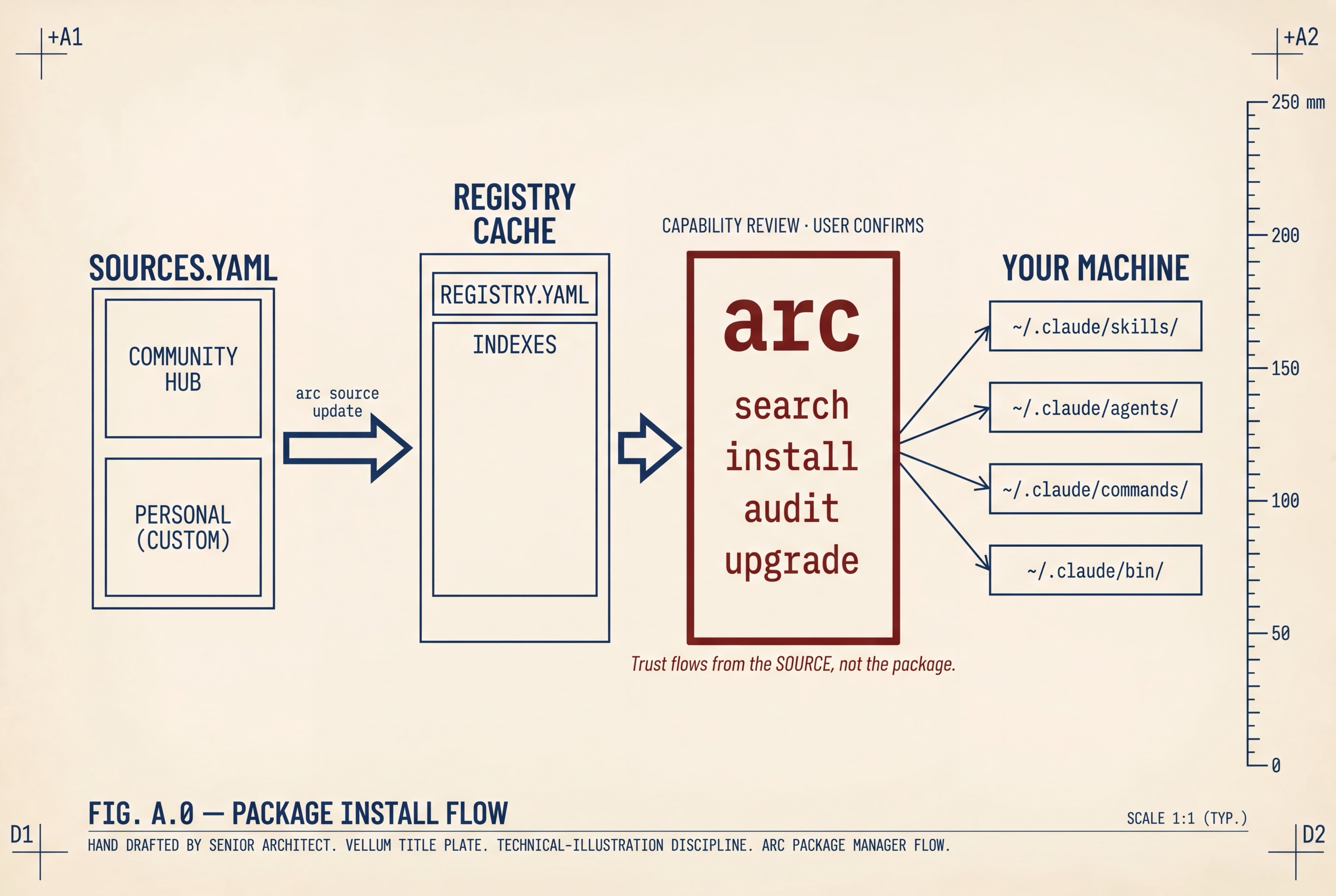
The four verbs
search shipped
Query every enabled registry source at once. Results are tagged with their source name and trust tier so you know what you're looking at before you install.
arc search doc
arc search --tier official
arc search react --json
install shipped
Resolves a package from any configured source, clones its source repo, reads the arc-manifest.yaml to
learn what capabilities it wants, and shows you the surface area before symlinking anything in. No npm. No Docker.
Just git clone, symlinks, and a manifest.
arc install _DOC                     # from any source
arc install https://github.com/foo/bar  # direct git URL
arc install _DOC --tier official     # only from official-tier sources
audit shipped
See your total attack surface in one command. Every capability granted to every installed package, grouped by tier, with cross-tier warnings when an untrusted package touches the same surfaces as a trusted one.
upgrade shipped
Compare every installed package against its registry version and upgrade the ones that drifted — like
apt upgrade, but with capability deltas shown before consent.
Trust flows from the source, not the package
Most package ecosystems trust packages by reputation. arc inverts that — trust is a property of the registry source you fetched the package from. Three tiers, each with its own install ceremony:
official    →  Auto-approves, minimal display.       (upstream maintained)
community   →  Shows capabilities, asks consent.     (community registries)
custom      →  Risk warning, full capability review. (direct git URLs)
Trust is not the product. Trust is what makes the product safe enough to exist.
The same package, installed from two sources, gets two different ceremonies. Promoting a registry to
official is a deliberate act — never the default.
Sources, like apt
Configured in ~/.config/metafactory/sources.yaml — auto-created on first run. Add more with
arc source add:
arc source add my-team \
  https://raw.githubusercontent.com/my-org/registry/main/REGISTRY.yaml \
  --tier community

arc source update                # like apt update — refresh all indexes
arc source list                  # show what's configured
Scaffolding & publishing
arc also scaffolds new artifacts and bundles them for publication. arc init my-skill drops a
compliant arc-manifest.yaml, a starter SKILL.md with the workflow scaffold, and
the type-specific files for the artifact you chose.
arc init my-skill                # default type: skill
arc init my-tool --type tool
arc init my-agent --type agent
arc init my-prompt --type prompt

arc bundle                       # produce a .tar.gz
arc publish                      # bundle + upload + register on metafactory
How it fits the stack
arc is the installer client for the metafactory distribution hub — the part that lives on your machine and talks to the part that lives on the network. It's the first piece of the ecosystem to ship and the one most people will meet first.
It sits beside myelin (the protocol stack agents communicate over) and cortex (the surface humans watch them through). Where myelin and cortex are about agents doing work, arc is about agents getting the skills to do it.
Status & roadmap
- v0.29.0 · active CLI — Bun runtime; macOS / Linux supported.
- Core package lifecycle — install, list, info, audit, verify, disable, enable, remove, upgrade, and self-update are shipped.
- Registry installs — scoped package refs such as
@metafactory/soma, version pins, capability review, and legacy unsigned-version warnings are shipped. - Authentication —
arc loginis required for installs and publishing against metafactory sources. - Multi-source registry — shipped. Three trust tiers: official, community, custom.
- Catalog, bundle, publish, and review — shipped. Sponsor/steward review is available through
arc reviewfor trusted+ accounts. - Host adapter foundation — shipped. Claude Code is the default host; Cortex adapter wiring exists; future Codex and Cursor hosts plug into the same adapter contract.
- Known upgrade caveat — if an active extracted install blocks
arc upgrade, remove the package and install the desired registry version again. - SkillSeal / Sigstore-style signing and runtime capability enforcement — still future integration work, not a shipped guarantee.